



Durable Objects allow you to create very novel architectures that at the same time, considerably simplify the development effort required. When combined with Cloudflare’s growing list of primitives, you can offload a sizeable amount of complexity to the platform itself. This leaves you to focus on the things that make your application unique.
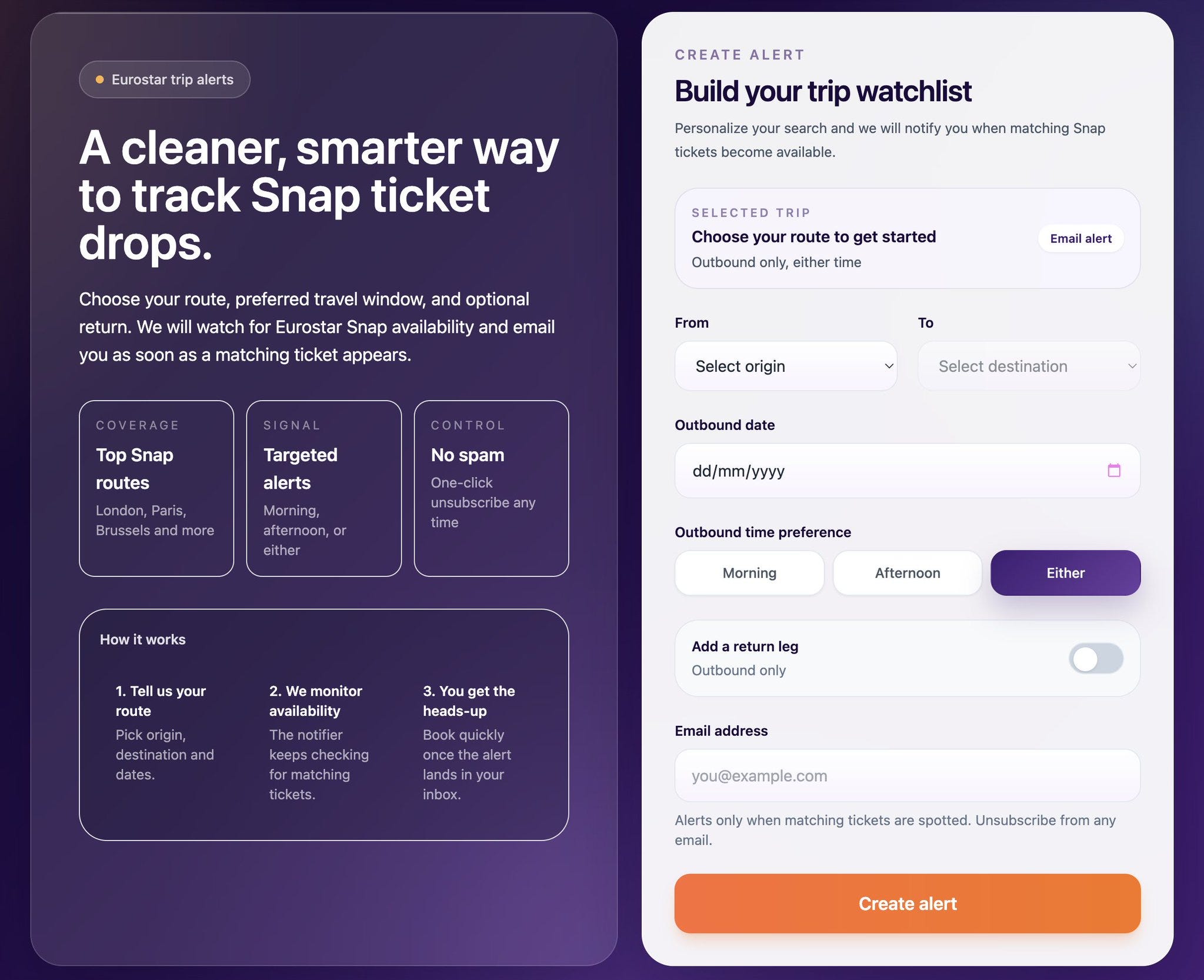
To demonstrate this, I built an application that notifies users when Eurostar Snap tickets become available for sale for your desired date and time. I never knew this website existed until recently, but effectively you can buy last minute Eurostar tickets very cheaply - some as cheap as £35 ($50) one way!
High-level Architecture
From the user’s point of view, the flow is really quite simple. A user selects the details of their trip such as from/to and the date, and if tickets become available, they receive an email notifying them.
On the technical side, we need the following:
A way to serve assets to the frontend
An API to handle form submissions & unsubscribes
Be able to store the trips we need to track that users select
Periodically check for ticket availability (we’ll do it every 20 minutes)
Scrape the website for tickets using a headless browser (there’s no API)
Send notification emails
We can map all these directly onto Cloudflare primitives like so:
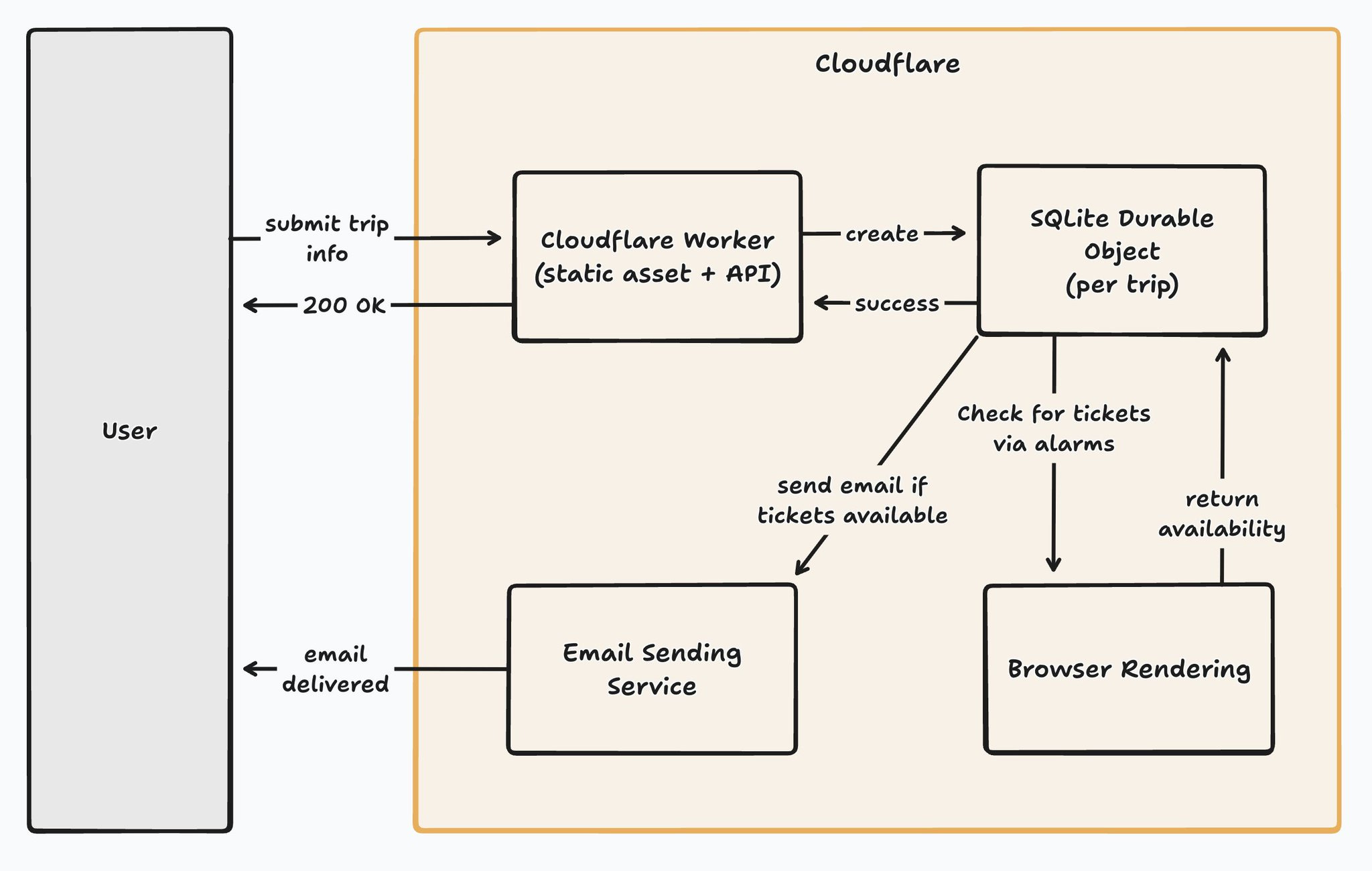
It’s really quite simple, as the platform is handling so much for us.
The Cloudflare Worker is responsible for serving the frontend using static assets, and also implements the backend APIs for form submissions and unsubscribes.
Durable Objects Are The Real MVP
We use Durable Objects to track the trips, with one created per unique trip combination using a simple key for each Durable Object (e.g. london-paris-2027-01-01).
If no Durable Object exists for a trip, we simply create one and store the user’s email. For all future submissions for that same trip, we just add the new email to the existing Durable Object.
For anyone not familiar with Durable Objects, they combine compute and storage into one primitive, so the storage for each trip lives inside each Durable Object instance.
The Durable Object does more for us than that though, as it uses the alarm functionality to wake up every 20 minutes to check if tickets are available. More on that later.
There’s A Primitive For Everything
In order to check availability, we need a headless browser, so the application makes use of Browser Rendering - effectively headless browsers as a service, with support for Puppeteer.
If tickets are found, we need to send an email to let users know. For that, the application uses Email Sending via Cloudflare, which is currently in closed beta at this time.
Is Cloudflare’s offering as vast as AWS or GCP? Nope, but it has all the key building blocks that the majority of applications need these days.
Durable Objects Are Just Code
Let’s take a look at what the Durable Object looks like. Best of all, it’s just code, with the underlying infrastructure handled by Cloudflare.
Before sharing the code, this is by no means glorious code - it was absolutely vibe-coded as it’s just a demo app.
Here’s how we initialize the Durable Object:
import { DurableObject } from "cloudflare:workers";
import * as puppeteer from "@cloudflare/puppeteer";
import { TripDetails } from "./shared";
import { sendNotificationEmail } from "./email";
import { checkAvailability } from "./scraper";

const FOURTEEN_DAYS_MS = 14 * 24 * 60 * 60 * 1000;
const TWENTY_MINUTES_MS = 20 * 60 * 1000;
const FIVE_MINUTES_MS = 5 * 60 * 1000;

function firstRow<T>(cursor: { toArray(): T[] }): T | undefined {
    return cursor.toArray()[0];
}

export class SnapNotifier extends DurableObject<Env> {
    constructor(ctx: DurableObjectState, env: Env) {
        super(ctx, env);
        this.ctx.storage.sql.exec(`
            CREATE TABLE IF NOT EXISTS trip (
                origin TEXT NOT NULL,
                destination TEXT NOT NULL,
                date TEXT NOT NULL,
                time_slot TEXT NOT NULL
            );
            CREATE TABLE IF NOT EXISTS subscribers (
                email TEXT NOT NULL UNIQUE,
                token TEXT PRIMARY KEY
            );
            CREATE TABLE IF NOT EXISTS availability_state (
                id INTEGER PRIMARY KEY CHECK (id = 1),
                last_seen_available INTEGER NOT NULL
            );
        `);
    }
]
As each Durable Object has its own SQLite database, and it sits on the same machine that runs your Durable Object, the majority of queries run in 0ms - that’s not a typo. We can then add a method that’s called via RPC to handle subscribes on form submission from the Worker:
async subscribe(email: string, trip: TripDetails): Promise<void> {
  const existing = firstRow(this.ctx.storage.sql.exec("SELECT 1 FROM trip LIMIT 1"));

  if (!existing) {
    this.ctx.storage.sql.exec(
      "INSERT INTO trip (origin, destination, date, time_slot) VALUES (?, ?, ?, ?)",
      trip.origin,
      trip.destination,
      trip.date,
      trip.timeSlot,
    );
  }

  const alreadySubscribed = firstRow(
    this.ctx.storage.sql.exec("SELECT token FROM subscribers WHERE email = ?", email),
  );

  if (!alreadySubscribed) {
    const token = crypto.randomUUID();
    this.ctx.storage.sql.exec(
      "INSERT INTO subscribers (email, token) VALUES (?, ?)",
      email,
      token,
    );
  }

  await this.scheduleAlarm(trip.date);
}
If you’re curious how the Worker and the Durable Object interact, there’s great information in the docs that cover it. This is what interaction with a Durable Object looks like though:
const outboundKey = buildDoKey(origin, destination, outboundDate, outboundTimeSlot); //london-paris-2027-01-01

const outboundStub = env.SNAP_NOTIFIER.get(
  env.SNAP_NOTIFIER.idFromName(outboundKey),
) as DurableObjectStub<SnapNotifier>;

await outboundStub.subscribe(email, {
  origin,
  destination,
  date: outboundDate,
  timeSlot: outboundTimeSlot as TripDetails["timeSlot"],
});
Once subscribed, we handle the alarms in code too:
private async scheduleAlarm(tripDate: string): Promise<void> {
  const tripMs = new Date(tripDate + "T00:00:00Z").getTime();
  const now = Date.now();

  const targetMs = tripMs - FOURTEEN_DAYS_MS;
  const alarmTime = targetMs > now ? targetMs : now + 1000;

  const currentAlarm = await this.ctx.storage.getAlarm();
  if (currentAlarm === null || currentAlarm > alarmTime) {
    await this.ctx.storage.setAlarm(alarmTime);
  }
}

async alarm(): Promise<void> {
  const tripRow = firstRow(
    this.ctx.storage.sql.exec("SELECT origin, destination, date, time_slot FROM trip LIMIT 1"),
  );

  if (!tripRow) return;

  const trip: TripDetails = {
    origin: tripRow.origin as string,
    destination: tripRow.destination as string,
    date: tripRow.date as string,
    timeSlot: tripRow.time_slot as TripDetails["timeSlot"],
  };

  const tripMs = new Date(trip.date + "T23:59:59Z").getTime();
  if (Date.now() > tripMs) {
    this.ctx.storage.deleteAll();
    return;
  }

  let browser: Awaited<ReturnType<typeof puppeteer.launch>> | null = null;
  try {
    browser = await puppeteer.launch(this.env.BROWSER);
    const result = await checkAvailability(browser, trip);
    const lastSeenAvailable = this.getLastSeenAvailability();

    if (result.available) {
      await this.sendNotifications(trip);
    }

    await this.ctx.storage.setAlarm(Date.now() + TWENTY_MINUTES_MS);
  } catch (err) {
    console.error("Availability check failed, retrying in 5 minutes:", err);
    await this.ctx.storage.setAlarm(Date.now() + FIVE_MINUTES_MS);
  } finally {
    if (browser) {
      await browser.close();
    }
  }
}
Note that an alarm is run once by default, but will retry on error automatically with exponential backoff. You’ll see in the alarm method, we set the alarm again at the end of the flow and control retries ourselves in this instance.
To optimise cost, once the trip date for a given Durable Object passes, we can just call deleteAll() and no longer trigger the alarm to remove any cost associated with that Durable Object.
Lastly, if tickets are found, we send the email from the Durable Object too:
private async sendNotifications(trip: TripDetails): Promise<void> {
  const rows = this.ctx.storage.sql
    .exec("SELECT email, token FROM subscribers")
    .toArray();

  if (rows.length === 0) return;

  const doId = this.ctx.id.toString();

  for (const row of rows) {
    const unsubscribeUrl = `${this.env.WORKER_URL}/api/unsubscribe?id=${doId}&token=${row.token as string}`;
    await sendNotificationEmail({
      trip,
      email: row.email as string,
      unsubscribeUrl,
    });
  }
}
There’s a little more code in the full application, but I omitted some as it’s not showing anything unique (e.g. unsubscribes, avoiding re-sending emails on repeat).
If you’ve not used the Cloudflare developer platform before, it’s also worth reading about bindings, as the code above makes use of them for interacting with both Browser Rendering and Email Sending. In short, they provide access to resources with an SDK injected at runtime for you to use - a bit like platform-level dependency injection.
Cloudflare Does The Undifferentiated Heavy Lifting
The big takeaway from this is the platform is doing all of the heavy lifting. TThe frontend is served globally, as is the backend API. There are no regions when deploying to Cloudflare, and both will scale based on demand.
We’re sharding by trip date, and each Durable Object can store up to 10GB of data - there’s no way we ever store so many email addresses we hit that limit. Alarms run independently on each Durable Object, so if one encounters an error, no others are impacted, and we don’t have to worry about crons or anything like that.
You’re only charged when a Durable Object is running too, so when it’s asleep between checking for ticket availability, there’s no runtime cost incurred.
Lastly, we offload the responsibility of handling the headless browsers to Browser Rendering and just interact with it using a simple API via Puppeteer, and it’s a one-liner to send an email with Cloudflare too once Email Sending becomes publicly available.
Both are charged in a serverless manner, with Browser Rendering charging $0.09 per browser hour, and Email Sending pricing TBC but fully expect it to be based on usage. There’s pricing available for Durable Objects too.
The speed at which you can move with Cloudflare is unmatched in my experience, and by no means is it perfect, but I’ll accept some of the warts if the platform is doing so much for me, and I highly recommend you give it a go too.